By Kai Ashford | Creative Director
Testing AI tools across real creative workflows
What Makes This Different
In Part 1, I covered the established players—DALL-E 3, Midjourney, Leonardo.ai. That was about the tools everyone already knows.
This is different.
Part 2 focuses on the newest models that dropped in late 2025/early 2026. The ones creative communities are actually buzzing about:
- Nano Banana Pro (Google’s Gemini 3 beast)
- GPT Image 1.5 (OpenAI’s latest)
- Seedream 4.5 (ByteDance’s dark horse)
More importantly: I actually tested them. Not with random prompts, but with real work—product shots for brands, album covers for artists, marketing content that needs to actually perform.
You’ll see real side-by-side comparisons. Same prompts across all three tools. Honest breakdowns of what works and what doesn’t.
Quick Picks: Best New AI Image Generators
Test #1: Product Photography (FLUX Energy Drink)
The Brief
Create a lifestyle product shot for a fictional energy drink called “FLUX Energy.” This is the kind of work I get constantly—indie brands need commercial-quality product photography but can’t afford full shoots.
The Prompt:
A professional lifestyle product shot of a young woman in her mid-20s with long dark hair, wearing a casual white t-shirt, holding up a vibrant energy drink can labeled "FLUX Energy" with lightning bolt logo, genuine smile, sitting at a modern minimalist desk with a laptop visible in background, natural window lighting from the left, shallow depth of field, commercial photography style, warm color grade, shot on Canon EOS R5, 85mm f/1.4
What this tests:
- Text rendering (the #1 AI struggle)
- Photorealism (skin, hair, lighting)
- Product placement
- Hands (notoriously hard)
- Would a real brand use this?
GPT Image 1.5 – Commercial King
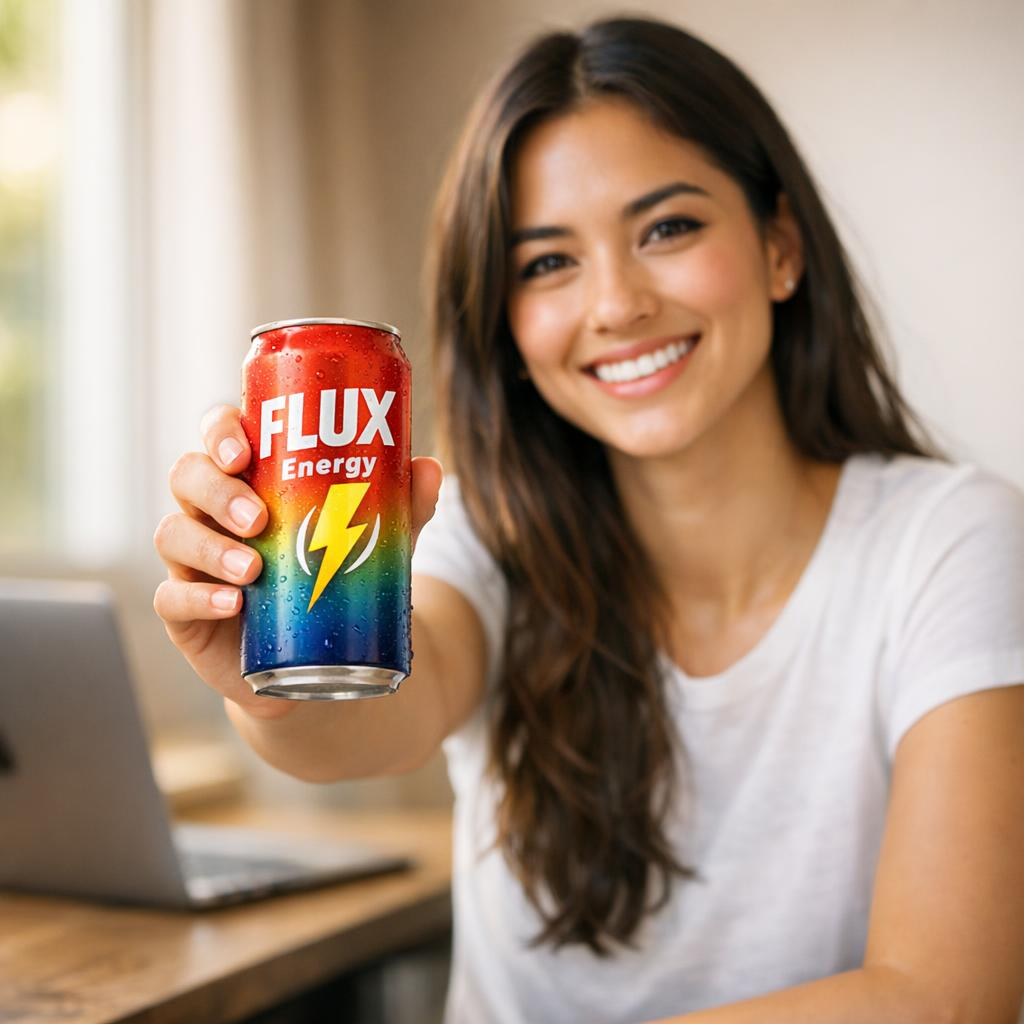
Generation time: ~12 seconds
First impression: This is billboard-ready.
What GPT nailed:
- Text rendering: “FLUX Energy” is crisp and legible
- Photorealism: Skin texture looks real—actual pores, natural hair detail
- Lighting: Beautiful window gradient, proper shallow depth of field
- Commercial viability: I could pitch this to a brand tomorrow
Where it’s weaker:
- The gradient on the can looks a bit AI-glossy
- Background laptop is slightly soft
Would I use this for a client? Yes, immediately.
Seedream 4.5 – The Speed Demon
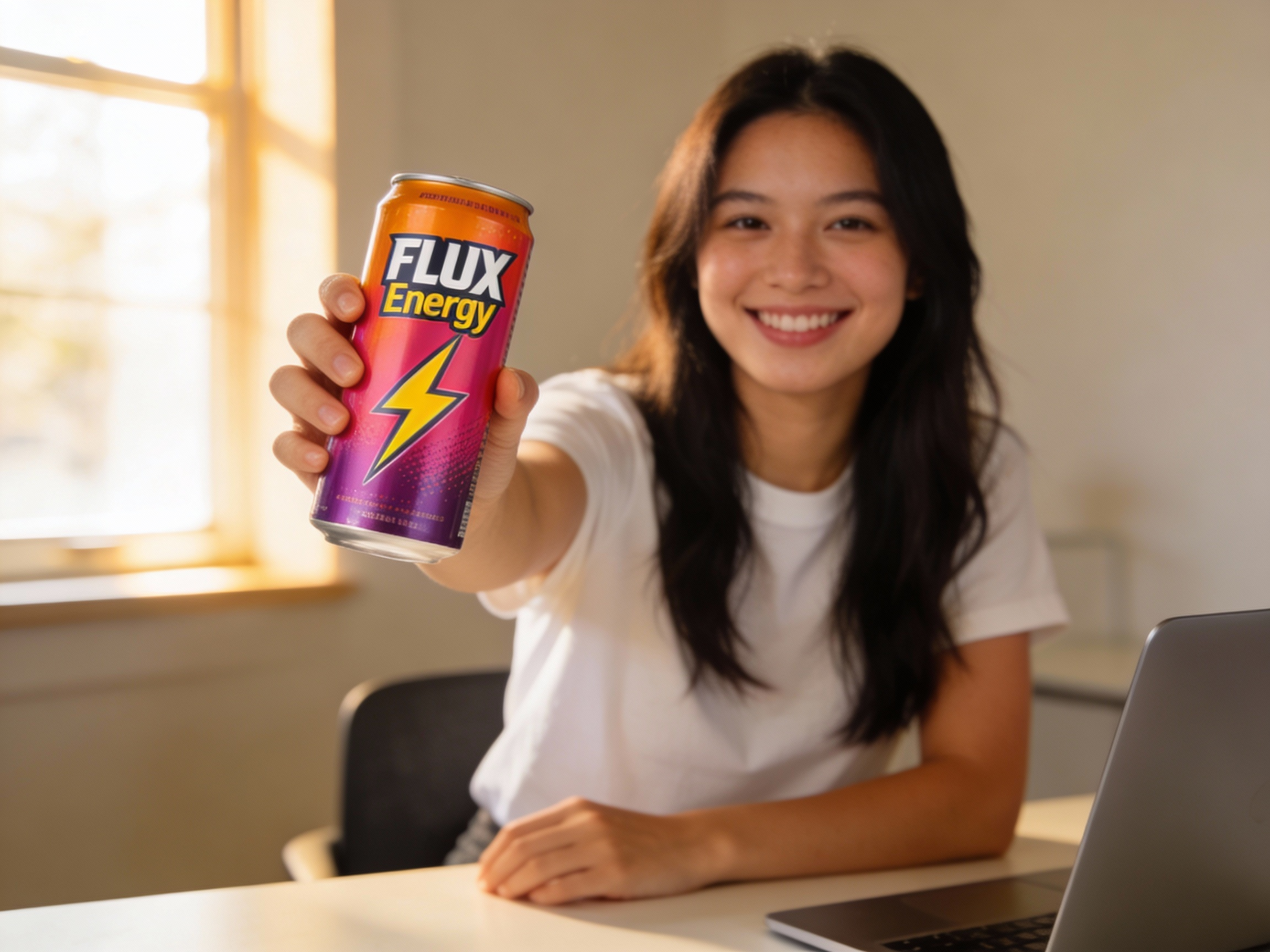
Generation time: ~8 seconds
First impression: Fast and solid, but less polished.
What worked:
- Speed: Fastest by far
- Composition: Different angle (extended arm) shows creative interpretation
- Lighting: Nailed the golden hour feel
- Can design: Vibrant gradient
What didn’t:
- Skin texture: Smoother/more “plastic” than GPT
- Text: “FLUX Energy” is there but less crisp
- Depth of field: Background isn’t as beautifully blurred
Would I use this for a client? For social media, absolutely. For print, I’d go GPT.
Nano Banana Pro – Creative But Less Polished
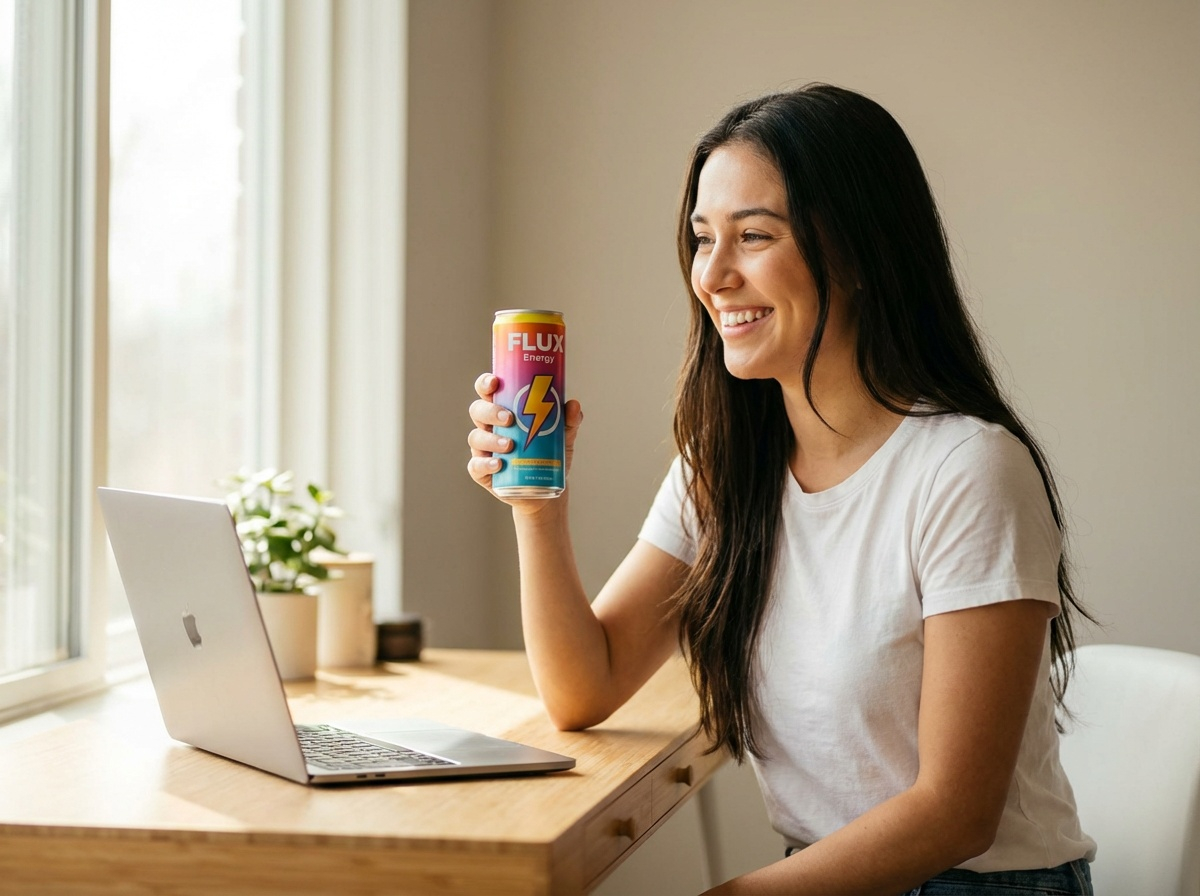
Generation time: ~15 seconds
First impression: Most stylized, least photorealistic.
What Nano brought:
- Creative product interpretation: The can design it invented is honestly the most interesting of the three
- Artistic feel: More editorial/stylized than the others
- Color: Nice warm tones
Where it struggled:
- Photorealism: This looks more illustrated than photographed
- Skin texture: Airbrushed/smoothed out
- Commercial feel: Doesn’t scream “Canon EOS R5”
💡 Important Note: For this test, none of these models had a reference image of what the FLUX Energy can should actually look like—they all invented it. If you were working with a real product, you’d feed in a reference image of the actual can. That’s where Nano Banana Pro starts to shine (more on that in Test #2).
Would I use this for a client? For editorial/creative work where stylization works, maybe. For straight product photography, no.
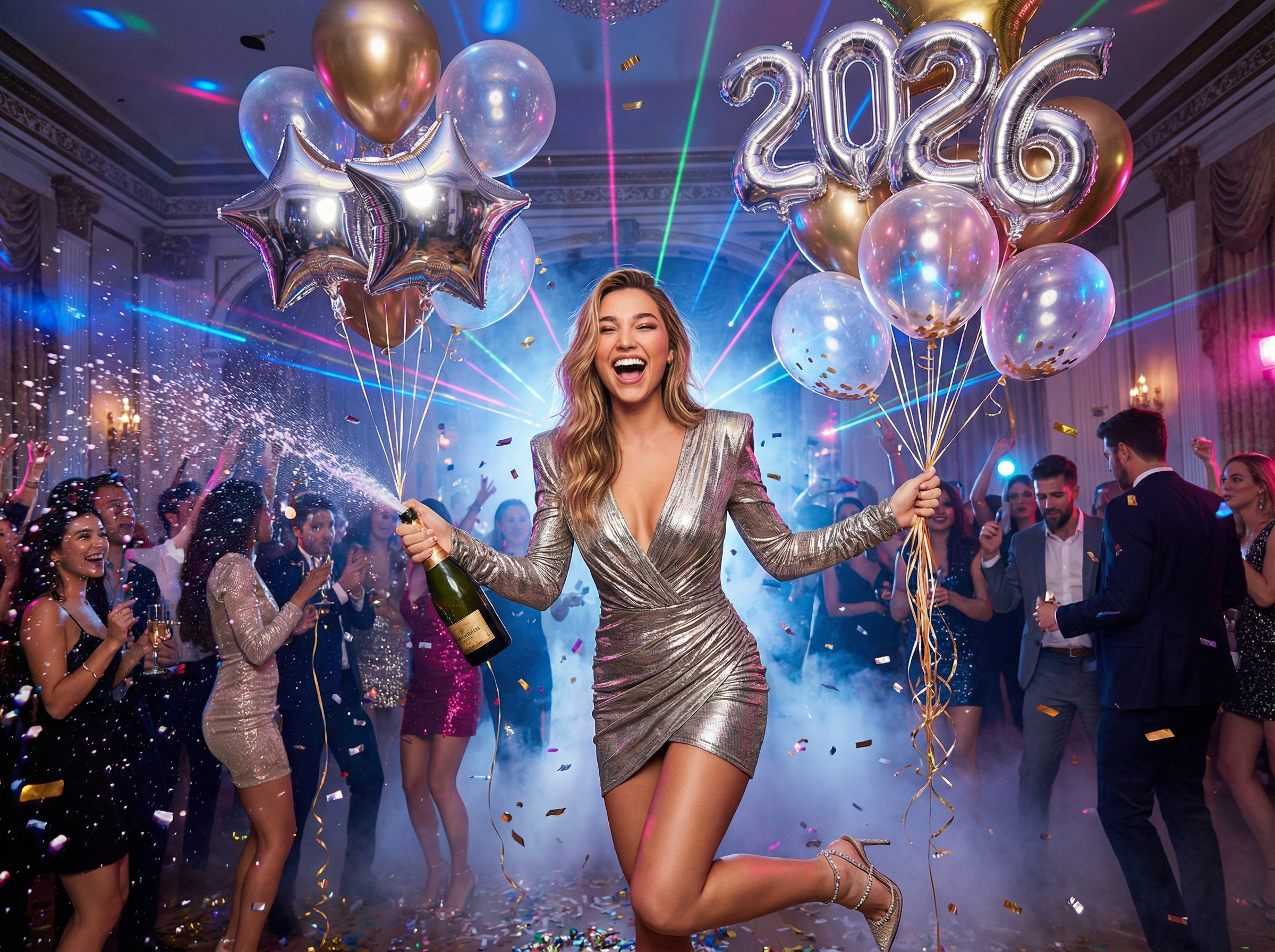
💡 Test #1 Verdict: All three are solid. GPT wins on photorealism, Seedream wins on speed, Nano wins on creative interpretation of the fictional product.
Test #2: Album Cover Photography (Character Consistency Test)
Why OpenArt.ai for This Test
Before we dive in, let me explain my workflow. For Test #2, I used OpenArt.ai as my testing platform, and here’s why it matters.
OpenArt.ai is a model aggregator—one interface that gives you access to dozens of AI models from different companies. Think Spotify for AI image generation. Instead of signing up for ChatGPT Plus, Google Gemini, ByteDance SEED, and juggling logins, you test everything in one place.
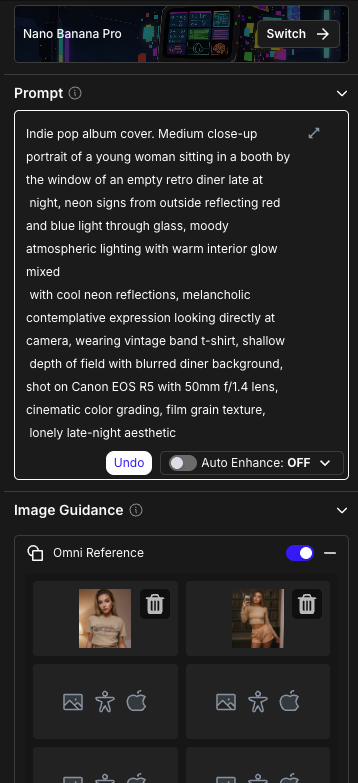
What makes OpenArt.ai valuable for testing:
- Model variety: Flux, Nano Banana Pro, GPT Image, Seedream, Stable Diffusion, and 50+ others in one platform
- Side-by-side comparison: Run the same prompt across multiple models with identical settings
- Image-to-image (img2img): Upload reference images and ask models to recreate characters in new settings
- Community features: Browse what others are making, remix prompts, learn from the best outputs
- Free tier: Experiment without paying for multiple subscriptions
- Advanced controls: Adjust guidance, steps, aspect ratios, negative prompts per model
For this test specifically, OpenArt let me upload reference images (photos of the same person) and ask each model to place her in a completely new scene while maintaining her facial features. That’s the img2img workflow, and it’s critical for testing character consistency—the holy grail for anyone doing album covers, branded content, or character-driven work.
You can also use these models in their native environments (ChatGPT for GPT Image, Gemini for Nano Banana, etc.). OpenArt just makes testing faster and side-by-side comparison easier.
The Brief
This test is harder: Can these models recreate the same character in a new setting?
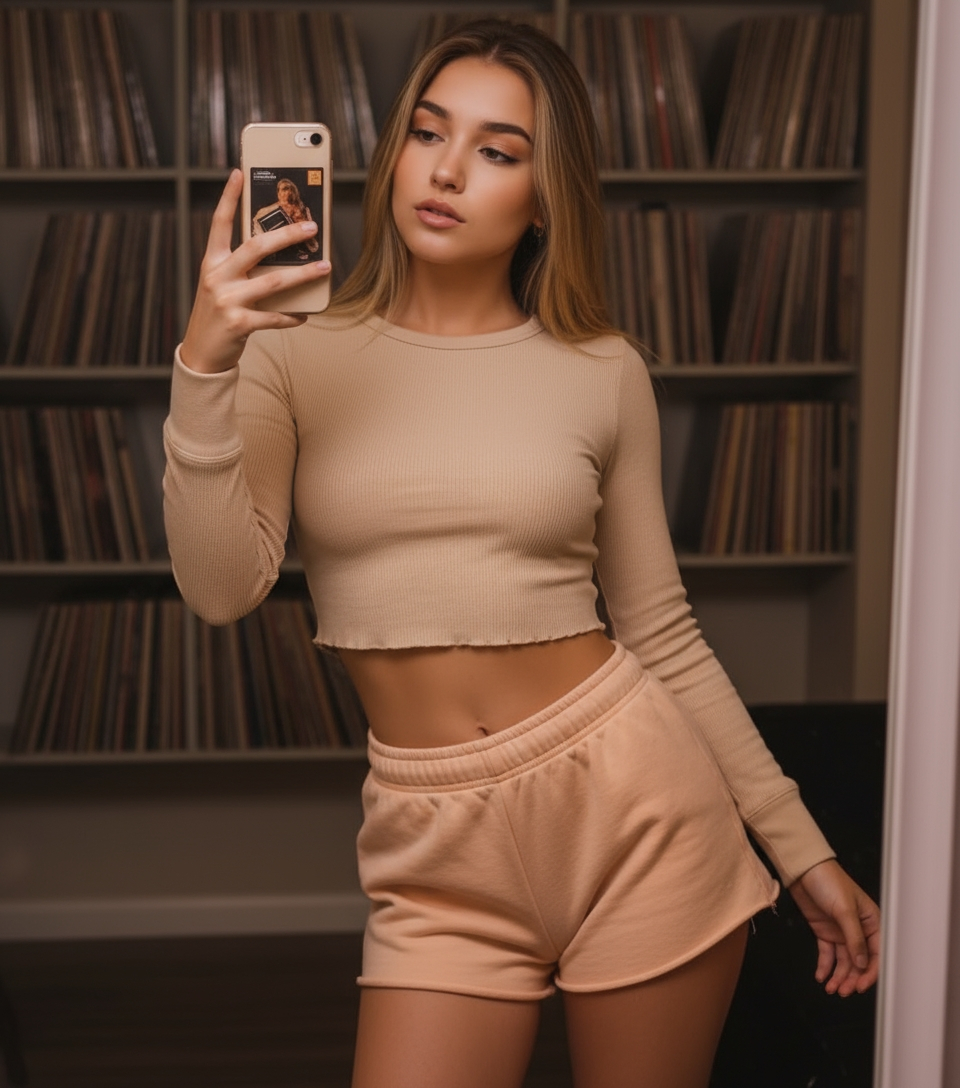
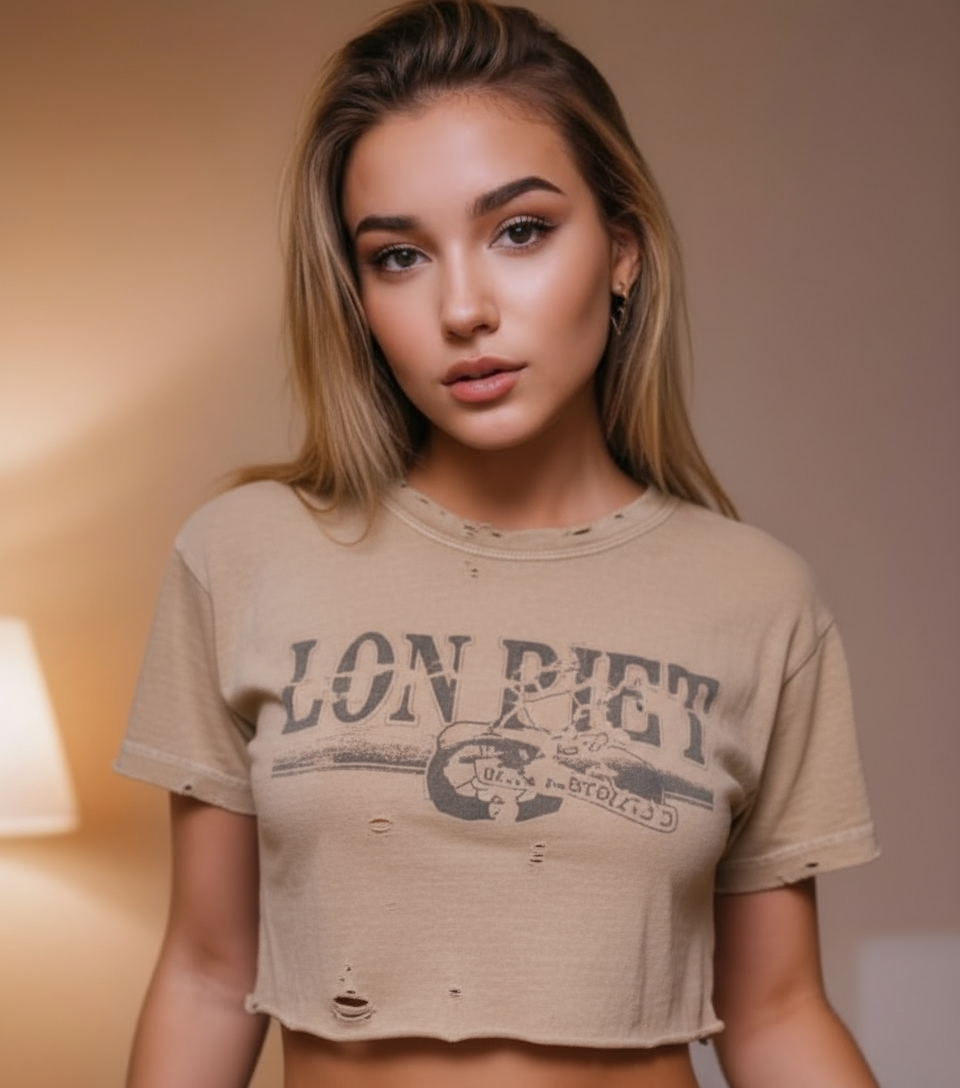
I gave all three models reference images (two photos of the same woman, AI-generated herself) and asked them to place her in a moody diner scene for an indie pop album cover.
What this tests:
- Facial consistency – Does she still look like herself?
- Style interpretation – Can it nail the “indie album cover” vibe?
- Lighting complexity – Neon reflections + interior ambience
The Reference Images
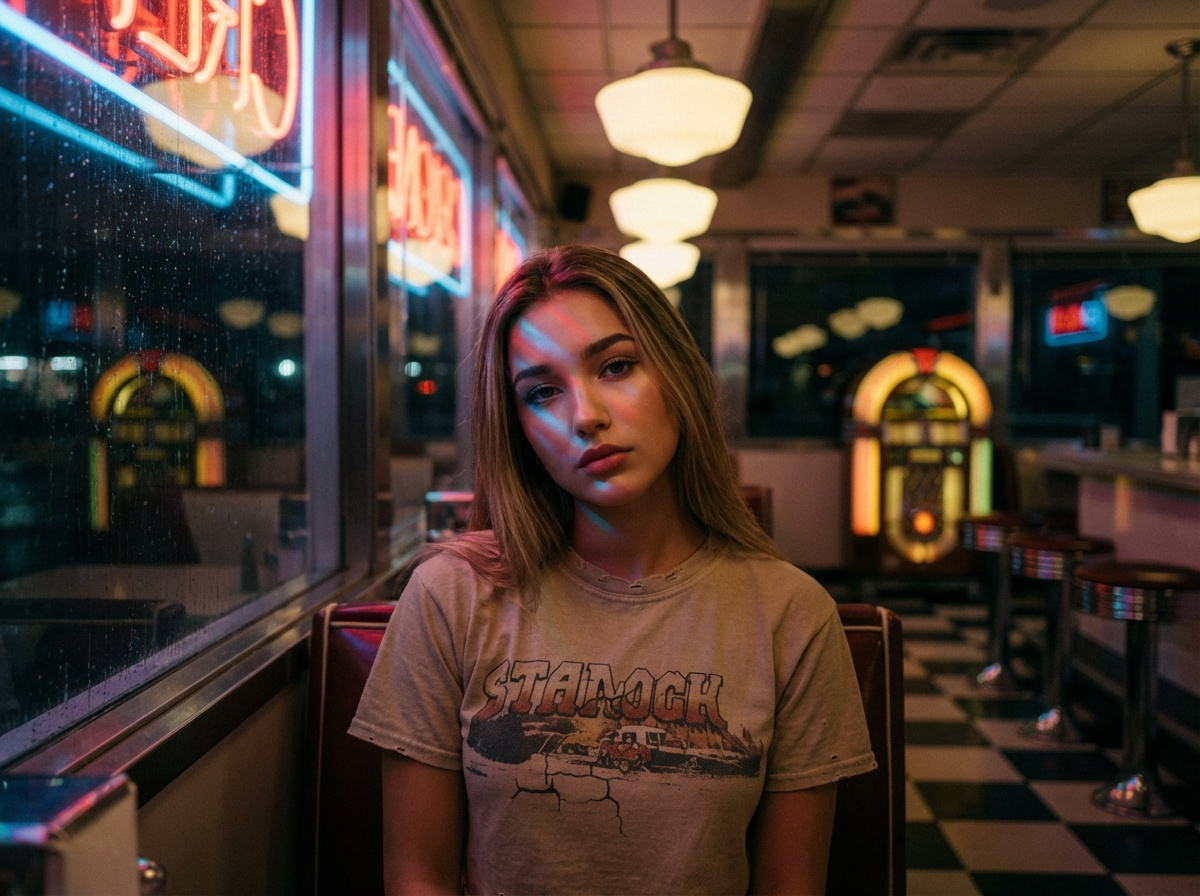
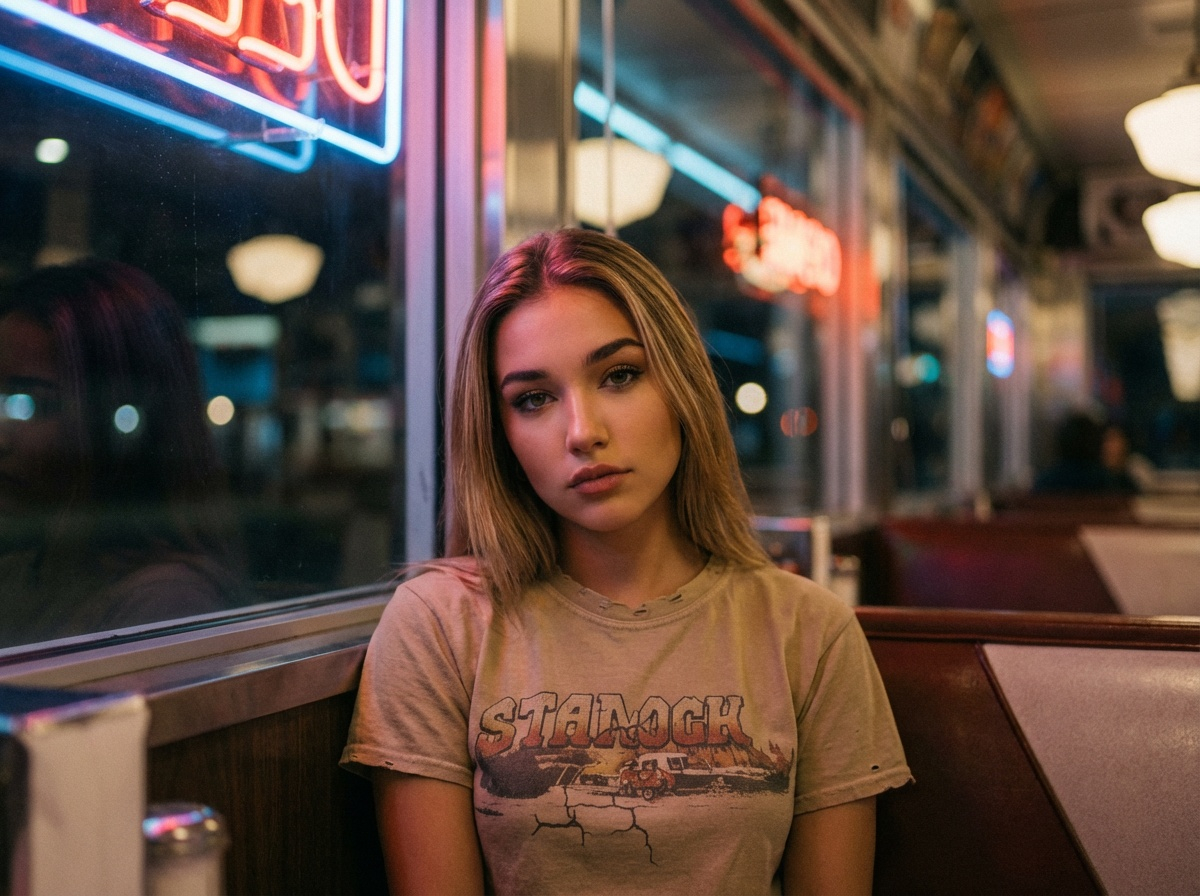
These are the images I fed into each model:
Important context: These reference images are themselves AI-generated. I’m testing how well each model can take an AI-created character and maintain consistency in a completely new scene.
The Prompt
Indie pop album cover. Medium close-up portrait of a young woman sitting in a booth by the window of an empty retro diner late at night, neon signs from outside reflecting red and blue light through glass, moody atmospheric lighting with warm interior glow mixed with cool neon reflections, melancholic contemplative expression looking directly at camera, wearing vintage band t-shirt, shallow depth of field with blurred diner background, shot on Canon EOS R5 with 50mm f/1.4 lens, cinematic color grading, film grain texture, lonely late-night aesthetic
I generated two outputs per model to show consistency (or lack thereof) across renders.
Nano Banana Pro – Nailed the Consistency (My Pick) 🏆
Generation time: ~18 seconds each
What worked:
- Facial consistency: Both renders clearly show the same person from the reference images. Her facial structure, eye shape, nose, mouth—all maintained.
- Atmosphere: Killer neon lighting and diner aesthetic
- Color grading: Moody blues and reds feel like a real album cover
- Composition: Great framing in both
What didn’t:
- Neon text: Background signs show gibberish (common AI issue)
- Band tee variety: Different shirts in each (expected)
💡 In my opinion, Nano crushed this test. When you compare these outputs to the reference images, she’s clearly the same person. That’s the whole point of this test. The photorealism might not be as polished as GPT, but it did the job it was supposed to do—maintain character consistency.
Would I use this for an album cover? Absolutely.
Seedream 4.5 – Solid Consistency, Smooth Aesthetic
Generation time: ~10 seconds each
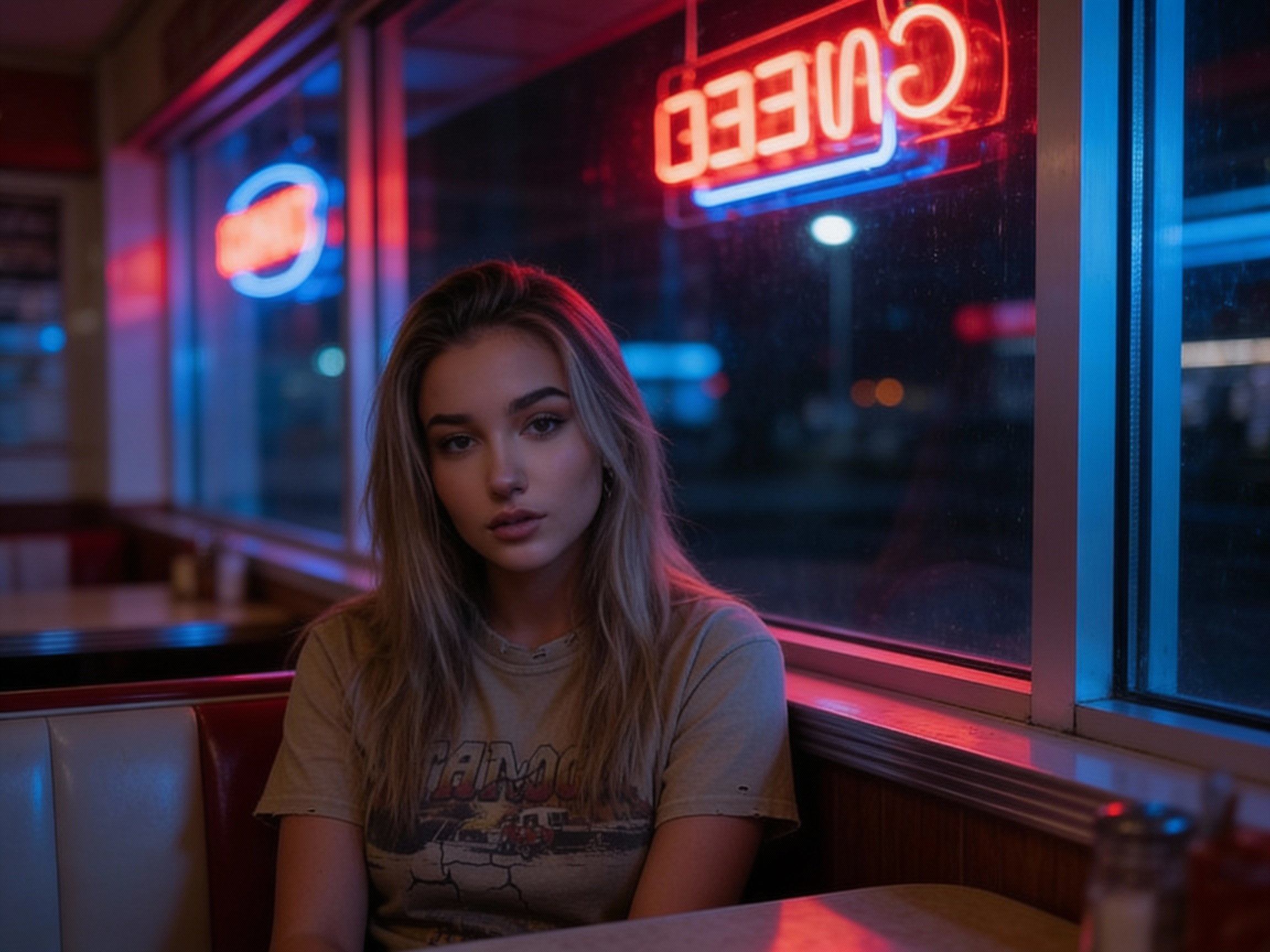
What worked:
- Facial consistency: Both renders show the same person—her features are maintained
- Speed: Fast generation
- Lighting: Beautiful neon reflections through glass
- Mood: Nails the melancholic indie vibe
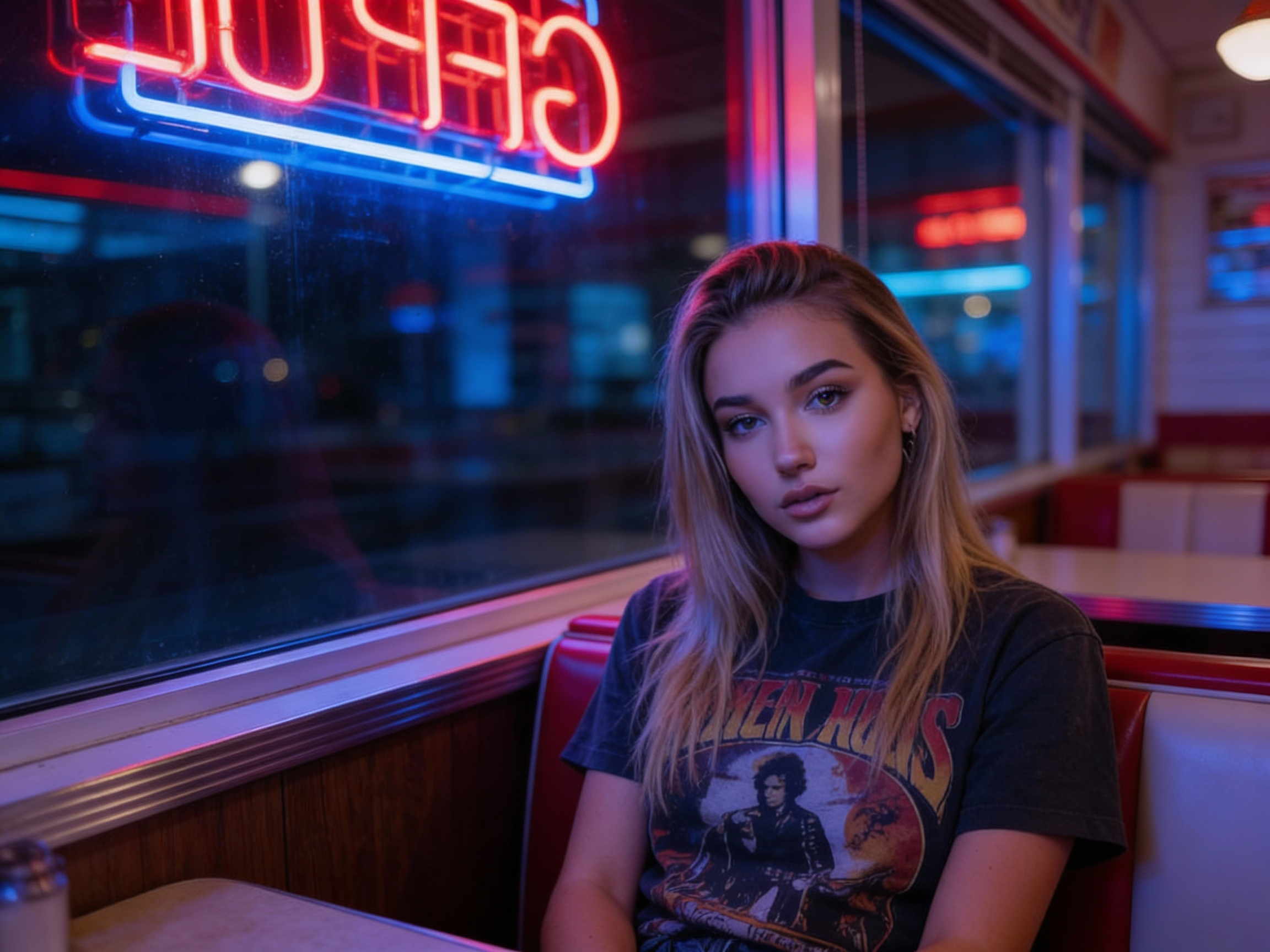
What didn’t:
- Skin texture: Overly smooth/porcelain finish
- Neon text: Gibberish/mirrored text (“COFFEE” backwards)
- Film grain: Missing the texture you’d get from real film
💡 Pro tip: If you love the composition but want more skin texture detail, OpenArt.ai includes upscaling tools right in the platform—or use third-party options like Topaz Gigapixel or Upscayl (free).
Seedream is tied with Nano for consistency. Looking at the reference images, she’s clearly the same person. The aesthetic is more polished/smooth than gritty, which works for some projects.
Would I use this for an album cover? Yes, especially for digital releases where the smooth look fits.
GPT Image 1.5 – Beautiful But Not Consistent
Generation time: ~14 seconds each
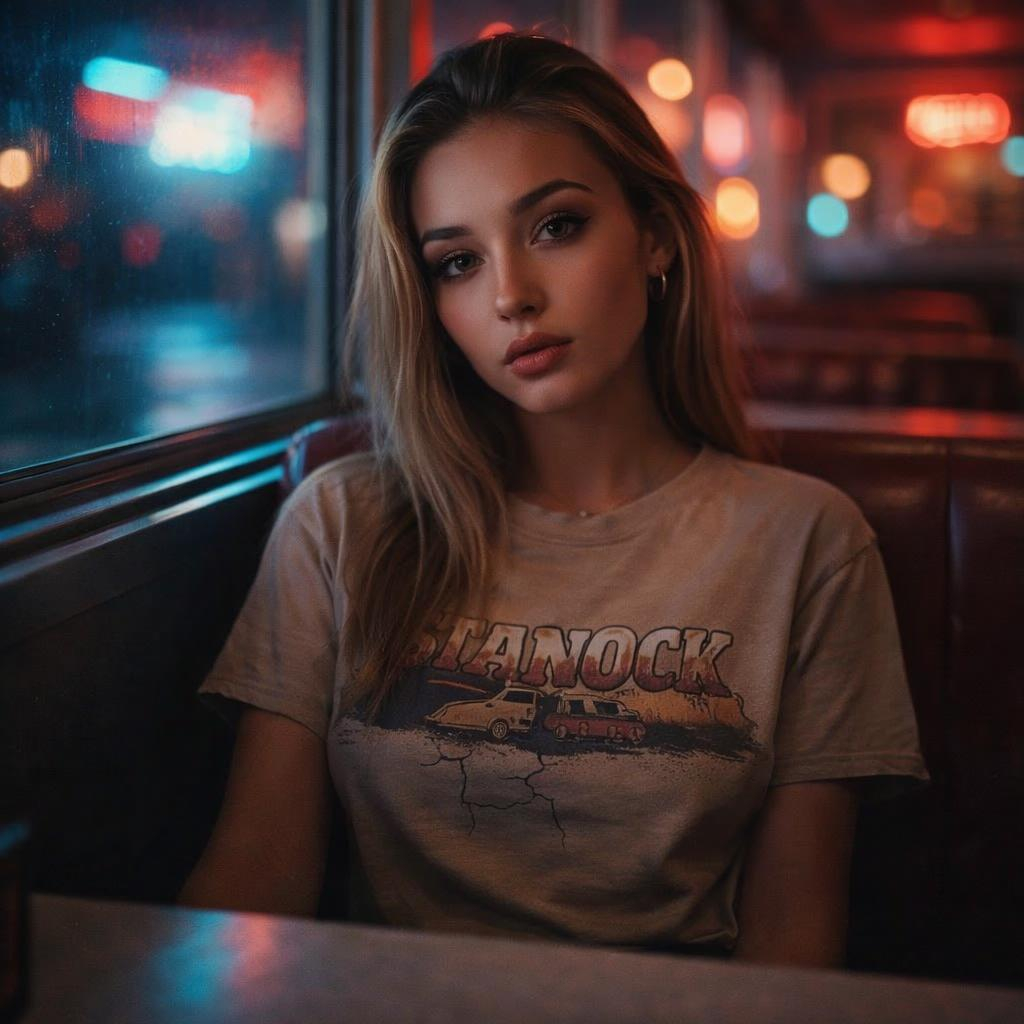
What worked:
- Photorealism: Best skin texture—real pores, natural lighting
- Bokeh: Cinema-quality background blur
- Film grain: Subtle texture that sells the film vibe
- Overall aesthetic: Looks like a real photo shoot
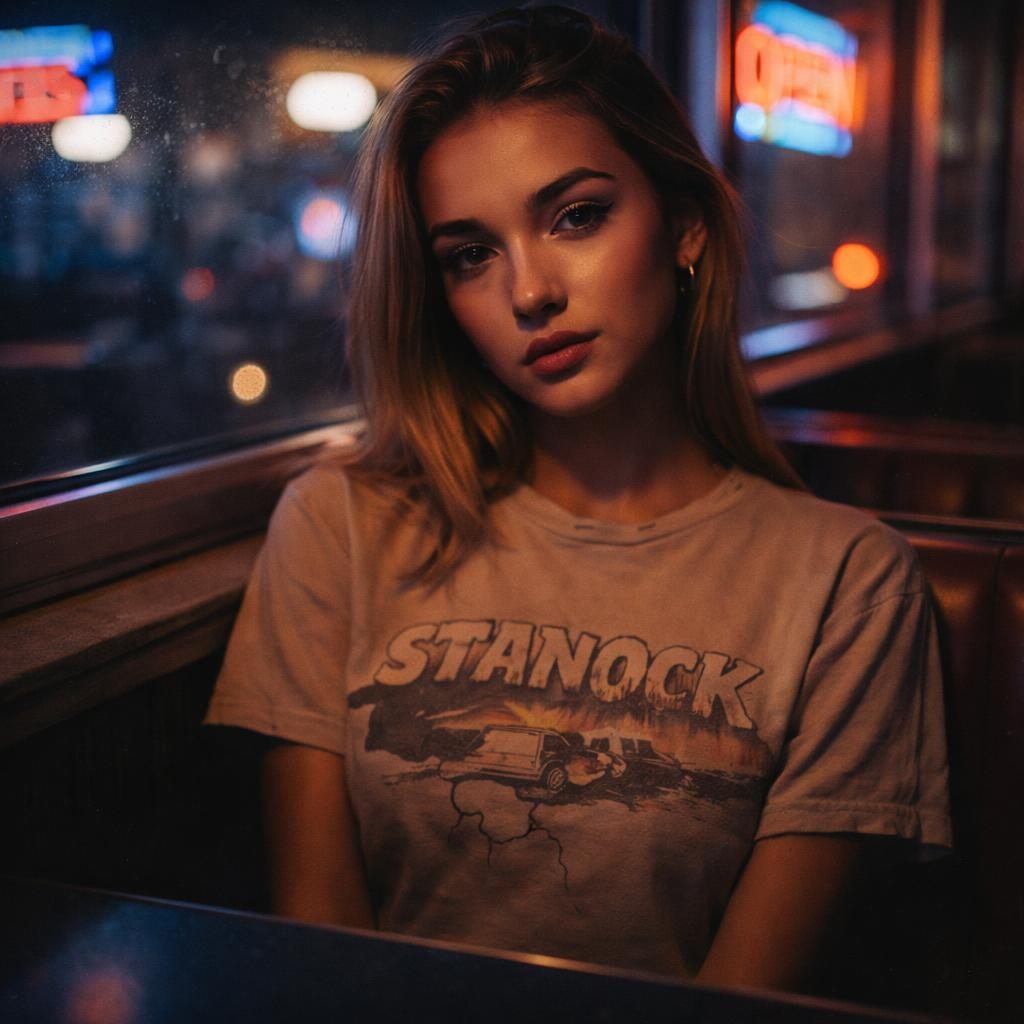
What didn’t (and this is critical):
- Facial consistency: These are beautiful images, but if you compare them back to the reference images, she doesn’t look like the same person. The facial structure is different. That’s a problem when the whole point is character consistency.
⚠️ Here’s the thing: GPT Image 1.5 made the most photorealistic, polished images. They look incredible. But this test wasn’t about making the prettiest picture—it was about maintaining the character from the reference images. And on that metric, GPT didn’t deliver.
Would I use this for an album cover? Only if I didn’t care about matching a specific person. If I needed “a woman in a diner,” yes. If I needed “THIS woman in a diner,” no.
💡 Test #2 Verdict:
Winner: Nano Banana Pro (my opinion)—maintained facial consistency while delivering killer atmosphere.
Tied runner-up: Seedream 4.5—also consistent, smoother aesthetic.
Third: GPT Image 1.5—most photorealistic but failed the consistency test.
The takeaway: When you’re working with reference images and need character consistency (album covers, branded content, character-driven projects), Nano Banana Pro and Seedream deliver. GPT makes beautiful images but struggles to maintain specific facial features from references.
The Models Explained
1. Nano Banana Pro (Google DeepMind)
Released: November 2025
Built on: Gemini 3 Pro Image
Access: Free (limited), Google Gemini, OpenArt.ai
What makes it special:
- Native 4K resolution (up to 4096×4096)
- Character consistency when using reference images
- Creative interpretation of fictional products/concepts
- Advanced editing features
- Free tier available
Best for:
- Album covers and character-driven work
- Projects requiring facial consistency
- High-resolution print work
- Creative/editorial projects where stylization works
- Testing without paying
Limitations:
- Less photorealistic than GPT (more painterly)
- Slower generation (~15-18 seconds)
- Text rendering still imperfect (gibberish signs)
ATR Score: 9.0/10
2. GPT Image 1.5 (OpenAI)
Released: December 2025
Built on: Proprietary OpenAI architecture
Access: ChatGPT Plus ($20/month), API, OpenArt.ai
What makes it special:
- Best photorealism (skin texture, lighting, detail)
- 4x faster than previous GPT Image
- Strong text rendering (better than most)
- Excellent prompt adherence
- Commercial-grade quality
Best for:
- Product photography (when you have product references)
- Marketing content where photorealism matters
- General-purpose image generation
- Social/web content
Limitations:
- Character consistency struggles with reference images
- Requires ChatGPT Plus or API ($20/month)
- Can be slower during peak times
ATR Score: 8.9/10
3. Seedream 4.5 (ByteDance)
Released: December 2025
Built on: BytePlus Seedream architecture
Access: Free on OpenArt.ai, ByteDance SEED platform
What makes it special:
- Fastest generation (<10 seconds)
- Good character consistency with references
- Cinematic color grading
- Free access via OpenArt
- Solid spatial relationships
Best for:
- High-volume content creation
- Social media work
- Projects where speed matters
- Testing multiple ideas quickly
Limitations:
- Skin texture less realistic (smooth/porcelain)
- Text rendering issues (gibberish/mirrored text)
- Less photorealistic than GPT
ATR Score: 8.7/10
ATR Score Breakdown
Why these scores:
Nano Banana Pro wins overall because of character consistency + creative interpretation + 4K output + free tier. The features and value are unmatched.
GPT Image 1.5 has the best photorealism, but the character consistency issue in Test #2 drops it slightly. For general-purpose work, it’s still incredible.
Seedream 4.5 is the speed champion and delivers solid results. Great for high-volume work where “good enough fast” beats “perfect slow.”
How to Choose
Choose Nano Banana Pro if:
- You need character consistency (album covers, branded characters)
- You’re working with reference images
- You want 4K native resolution
- You prefer creative/editorial aesthetics
- You want to test for free first
Choose GPT Image 1.5 if:
- You need photorealistic product shots (with product references)
- Skin texture and lighting realism matter most
- You’re creating general marketing content
- You already have ChatGPT Plus
Choose Seedream 4.5 if:
- Speed is your top priority
- You’re making high volumes of content
- Social media is your main output
- You want free access via OpenArt
My Real-World Workflow
For album covers / character work:
- Primary: Nano Banana Pro (consistency matters)
- Backup: Seedream 4.5 (if I need speed)
For product photography:
- Primary: GPT Image 1.5 (with product reference images)
- Backup: Seedream (for social media iterations)
For social content at scale:
- Primary: Seedream 4.5 (speed wins)
- Upgrade: GPT Image if quality is critical
For high-res prints:
- Nano Banana Pro (4K native)
The Text Rendering Problem (Still Unsolved)
All three models struggle with accurate text in complex scenes.
In both tests:
- Neon diner signs = gibberish or mirrored text
- Product labels worked but weren’t perfect
- Background text = hit or miss
The workaround: Generate the image, add text in Photoshop/Figma afterward. Don’t rely on AI for final text in critical branding work.
Nano Banana Pro markets “superior text rendering,” and it’s better than most—but still not reliable for final deliverables.
Frequently Asked Questions
Which AI image generator is best for character consistency?
Nano Banana Pro and Seedream 4.5 both excel at maintaining facial features when you provide reference images. In my testing, Nano had a slight edge. GPT Image 1.5 makes beautiful images but struggles to keep specific facial features consistent with references.
Which is best for photorealism?
GPT Image 1.5 is the photorealism king—the skin texture, lighting, and overall “this looks like a real photo” quality is unmatched. Just be aware it’s weaker on character consistency from references.
What’s the best free AI image generator in 2026?
Nano Banana Pro via Google Gemini (generous free tier) and Seedream 4.5 via OpenArt.ai (free with limits). Both are excellent for testing and personal projects.
How do these compare to Midjourney and DALL-E 3?
These are more photorealism and consistency-focused than Midjourney (which excels at artistic/stylized work). GPT Image 1.5 is essentially an upgraded DALL-E 3. For commercial product shots and character work, these three win. For pure artistic imagery, Midjourney v7 still reigns.
See Part 1 for the full Midjourney vs DALL-E comparison.
Can I use these images commercially?
GPT Image 1.5: Yes, with ChatGPT Plus or API access.
Nano Banana Pro: Yes (check Google’s current terms).
Seedream 4.5: Yes, ByteDance allows commercial use.
Always verify current terms for your use case.
My Studio Setup (2026)
What I’m running:
- ChatGPT Plus ($20/month) – GPT Image access
- OpenArt.ai (free tier) – Testing Nano, Seedream, others
- Google Gemini (free) – Nano Banana Pro access
Total cost: $20/month
Time saved: 15-20 hours per week on concept work
OpenArt gives me fast testing access, ChatGPT Plus covers my commercial work. I don’t need separate subscriptions to each native platform.
Final Thoughts
These three models represent a major leap:
- Photorealism is solved (GPT Image proves it)
- Speed is no longer an issue (Seedream <10 seconds)
- Character consistency is here (Nano + Seedream deliver)
- 4K is standard (Nano native, others upscale)
The only unsolved problem? Text rendering in complex scenes. Still need Photoshop for final text overlays.
But for everything else? These tools are commercial-ready now.
If you’re still manually creating mockups or paying for stock photography, these models will save you hundreds of hours a year.
Ready to Test?
All three models are accessible today:
Start with the free options (Nano, Seedream on OpenArt), test with your actual work, then invest in ChatGPT Plus if you need GPT’s photorealism.
Related Guides
- AI Image Generators Part 1 – Midjourney, DALL-E 3, Leonardo.ai
- How We Test – ATR Score methodology
- Best AI Tools for Content Creation
Disclosure: This site contains affiliate links. Purchases through our links may earn us a commission at no extra cost to you. Read our full disclosure.
Last Updated: February 5, 2026
Next Review: When major model updates release
Questions? Contact us.