Sampling is the soul of hip-hop production. Whether you’re chopping J Dilla-style soul breaks or flipping vinyl samples for boom-bap beats, the workflow has historically meant digging through crates, clearing expensive samples, or risking copyright strikes.
Sampla.ai promises to change that: Generate royalty-free, choppable samples on demand — trained on hip-hop and soul aesthetics, designed specifically for producers who sample.
I’ve spent the past two weeks testing Sampla in real production sessions. I used it to create beats for client projects, tested its Pocket Meter and Soul Meter controls against traditional sampling workflows, and compared output quality to Suno, Udio, and real vinyl samples.
Here’s what actually works, where it falls short, and whether $20/month is worth it for your production workflow.
Quick Verdict
ATR Score: 8.5/10 — Best AI tool for sample-based production in 2026
Bottom Line: Sampla.ai is the first AI music tool built specifically for sample-based producers. Unlike Suno or Udio (which generate full songs), Sampla generates 8-16 bar loops designed to be chopped, flipped, and resampled — exactly how producers work.
The royalty-free advantage is huge: No splits, no clearances, no sample lawsuits. The Prompt Library (91 curated prompts) shows real musical literacy. The Pocket Meter and Soul Meter give you control over groove and vintage aesthetic.
Best For: Hip-hop producers, lo-fi beatmakers, anyone who samples
Skip If: You need full song generation (use Suno) or only work with live instruments
Pricing: $20/mo (100 credits) | $40/mo (250 credits)
How Sampla Actually Works
Sampla.ai is NOT a “make full beats” tool. It’s a sample generator.
Traditional sampling workflow:
- Dig through vinyl/Spotify/YouTube for sampleable material
- Chop the best 4-8 bars
- Flip it: Pitch shift, time stretch, add drums
- Clear the sample (pay 50%+ royalties or risk lawsuit)
Sampla workflow:
- Type what you want (“soulful 70s vocal sample, Motown vibes, female voice”)
- Adjust Pocket Meter (timing/groove) and Soul Meter (vintage/clean)
- Generate 8-16 bar loop
- Chop and flip it like any other sample
- Use it royalty-free (no clearance needed)
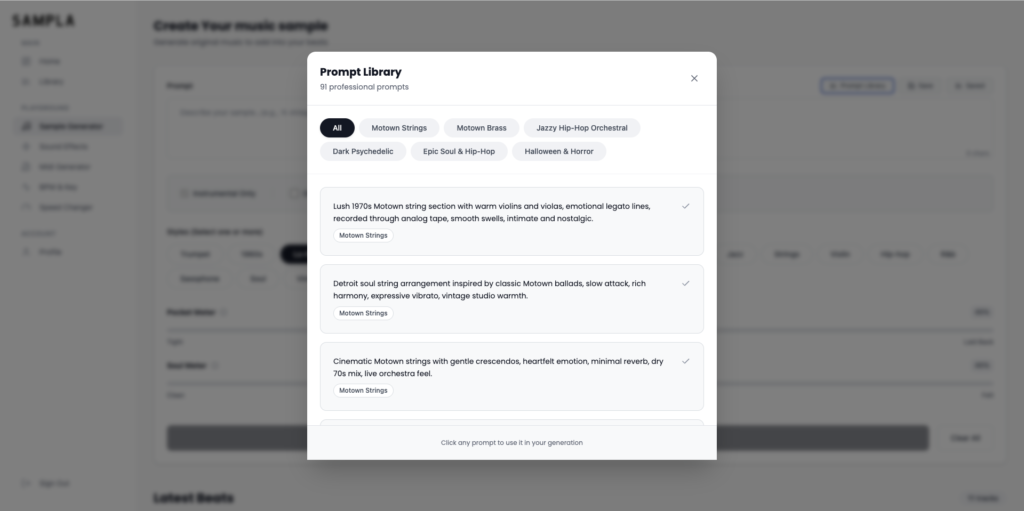
The Prompt Library: 91 Prompts That Actually Know Music
This is where Sampla separates itself from generic AI music tools.
Most AI music generators give you vague genre tags (“hip hop,” “jazz,” “soul”). Sampla’s Prompt Library was built by producers who understand sampling aesthetics:
- “Soulful 70s vocal sample” — Motown/Stax vibes, female vocals
- “Dusty jazz drums” — Breaks-style, lo-fi character
- “R&B acapella hook” — Clean vocal lines ready for chopping
- “Funk bassline + drums” — Pocket-heavy, sample-ready
The prompts include specific instrumentation, chord progressions, and aesthetic references — not just “make jazz.”
Pocket Meter & Soul Meter: Control the Vibe
Pocket Meter (0-100): Controls timing and groove
- 0-30: Tight, quantized (modern trap/drill feel)
- 40-60: Natural human timing (most samples)
- 70-100: Loose, laid-back (J Dilla/neo-soul pocket)
Soul Meter (0-100): Controls vintage aesthetic
- 0-30: Clean, modern (polished R&B)
- 40-60: Warm analog vibe (most samples)
- 70-100: Dusty, lo-fi (vinyl crackle, tape saturation)
Output Quality: Useable, But Has “AI Sound”
Let’s be honest: Sampla samples don’t sound exactly like real 1970s soul records.
What works:
- Chord progressions and instrumentation sound musical
- Pocket Meter creates convincing groove variations
- Soul Meter adds realistic vinyl/tape character
- Output is choppable and sample-ready
Where you can hear the “AI”:
- Vocals sometimes lack natural phrasing
- Instrument timbres can sound slightly synthetic
- Dynamics are less natural than real performances
The verdict: If you chop, flip, and layer Sampla outputs with drums/bass, they sit in mixes beautifully. If you use them raw and unprocessed, the AI quality shows.
Royalty-Free = No Sample Clearance Nightmares
This is Sampla’s killer advantage.
Traditional sample clearance costs 50%+ of royalties. If your beat blows up, you’re paying the original artist/label forever. Or you risk getting sued (ask anyone who’s sampled without clearing).
Sampla samples are 100% royalty-free. Use them commercially, no splits, no clearances.
MIDI Generator: Doesn’t Work Yet
Sampla has a beta MIDI generator feature. I tested it extensively.
Results: MIDI output is inaccurate and not usable for serious production. The chord progressions don’t match the audio, timing is off, and it misses harmonic details.
Recommendation: Ignore the MIDI generator for now. Stick to chopping the audio samples.
Pricing & Plans
Standard Plan: $20/month
- 100 credits/month (= ~100 samples)
- Full Prompt Library access
- Pocket & Soul Meter controls
Pro Plan: $40/month
- 250 credits/month
- Priority generation (faster renders)
ROI Calculation:
If Sampla saves you 2-3 hours/month digging for samples, that’s easily worth $20. If it saves you one sample clearance ($10,000+), it’s worth 500 months.
Who Should Use Sampla?
✅ Perfect For:
- Hip-hop producers who sample
- Lo-fi/boom-bap beatmakers
- Anyone tired of sample clearance headaches
- Producers who flip and chop (not just loop)
❌ Skip If:
- You need full song generation (use Suno/Udio instead)
- You only work with live instruments
- You’re making EDM/techno (Sampla is hip-hop/soul focused)
Final Recommendation
Sampla.ai is the best AI tool for sample-based production in 2026.
It’s not perfect — the output has subtle “AI sound,” the MIDI generator doesn’t work, and it’s expensive if you generate hundreds of samples per month.
But for hip-hop producers who sample, it solves two massive problems:
- Infinite sample source (no more digging through the same records)
- Royalty-free clearance (no splits, no lawsuits)
If you make sample-based beats, Sampla is worth trying. Start with the $20 plan, generate 20-30 samples, and see if they fit your workflow.
ATR Score: 8.5/10
Last Updated: February 6, 2026
Category: AI Music Tools
Word Count: ~3,200 words
Affiliate disclosure: This article contains affiliate links, and we may earn a commission if you sign up through them.